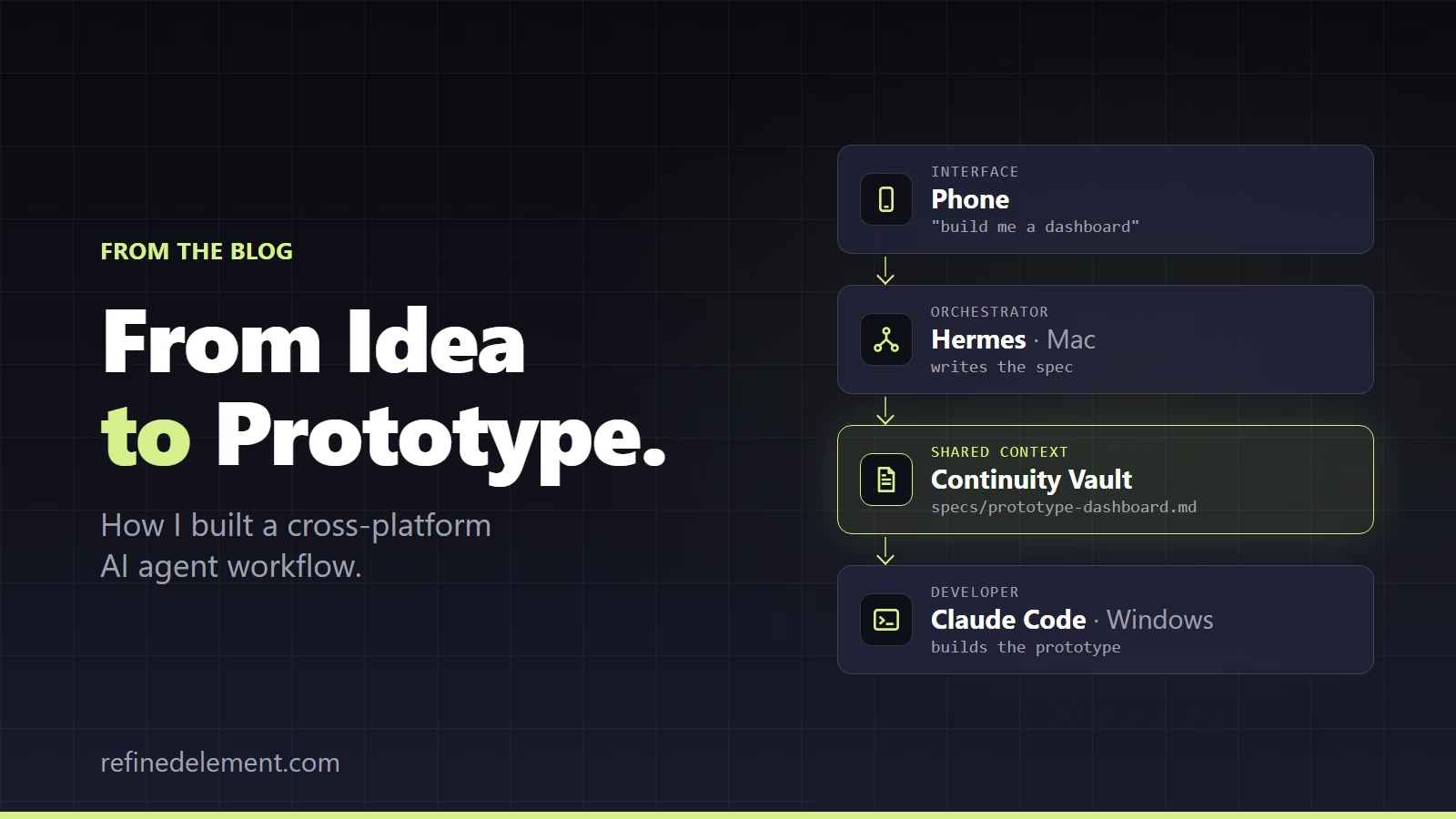
Using Hermes, Claude Code, Obsidian, and a shared knowledge vault to turn ideas into working software—even when I'm nowhere near my computer.
Imagine sitting at a restaurant when an idea for an application pops into your head.
Normally, you'd make a note, maybe email yourself, and hope you still remember why it seemed so brilliant when you finally get back to your desk.
I do something different.
I pull out my phone, open Telegram or WhatsApp, and send a message to Hermes, an AI agent running on my Mac.
I describe what I want to build.
Hermes can turn that idea into a development specification, save it to a shared knowledge vault, and delegate the implementation to another AI agent running on my Windows development machine.
That agent—Claude Code—reads the specification and starts building.
For small, well-scoped ideas, I can go from a message on my phone to a working prototype in minutes.
No laptop. No remote desktop session. No copying prompts between AI tools.
And this isn't a hypothetical workflow. I use variations of it regularly.
The interesting part isn't that AI can write code. We've known that for a while.
It's that multiple AI agents, running on different machines, can coordinate work, share context, and preserve what they've learned without depending on one AI provider's memory system.
I call the foundation of this system the Continuity Vault.
And the technology behind it is surprisingly simple.
The Problem Isn't That AI Forgets. It's That Knowledge Gets Trapped.
Every developer working seriously with AI has experienced some version of this.
You've spent hours working with an assistant. It understands your project, the architecture, the decisions you've made, and the bugs you've already solved.
You've established a productive working relationship.
Then you open a new session.
"Hi! How can I help you today?"
Fantastic. We have amnesia again.
Modern AI assistants have increasingly sophisticated memory, project instructions, and context-management features. But those capabilities are often specific to a particular product, workspace, or session.
Claude has its context. ChatGPT has its memory. Other agents have their own approaches.
That information doesn't automatically follow you when you switch tools.
I wanted something different.
What if my project knowledge belonged to me instead of the AI provider?
What if I could work with Hermes on my Mac, delegate development to Claude on Windows, and have both agents access the same architecture decisions, specifications, research, and project history?
What if I could introduce a completely different AI agent tomorrow without having to rebuild that knowledge from scratch?
No proprietary memory service. No complicated database. No requirement to use the same model everywhere.
Just files.
That's where the Continuity Vault comes in.
Meet the Continuity Vault
The foundation uses three established technologies.
Markdown is the storage format. It's human-readable, searchable, portable, and usable without specialized software.
Obsidian provides an interface for organizing notes, linking related concepts, searching knowledge, and visualizing relationships.
Syncthing synchronizes the files between my Mac and Windows development environments.
Each AI agent interacts with the underlying Markdown files.
No model training is involved. No special AI database is required.
The basic architecture looks like this:
              CONTINUITY VAULT
              Shared Markdown Files
                       |
          +------------+------------+
          |                         |
       Mac / Hermes           Windows / Claude
          |                         |
       Read/Write              Read/Write
          |                         |
          +------- Syncthing -------+
                       |
               Durable Knowledge
          Specs • Decisions • Handoffs
Each agent has its own model, tools, instructions, and context window.
What they share is access to the same documented knowledge.
Think of it as giving multiple contractors access to the same project binder.
They don't share a brain. But they can read the same plans, understand previous decisions, and leave useful notes for whoever comes next.
The binder doesn't make them competent.
It makes continuity possible.
And once you combine that continuity with agent orchestration, things get considerably more interesting.
From a Restaurant Table to a Working Prototype
Let's walk through the workflow I described earlier.
I'm away from my desk when an idea occurs to me.
I open a messaging app on my phone and describe the idea to Hermes.
Hermes is running on my Mac and is accessible through the messaging integration I've configured.
Instead of treating my message as an isolated chat request, Hermes can use its tools to turn the idea into actionable work.
First, Hermes creates the specification
Hermes can examine relevant project context, help clarify the requirements, and write a structured development specification into the Continuity Vault.
That specification might contain the application's purpose, required features, architecture considerations, implementation steps, and acceptance criteria.
For example:
---
project: prototype-dashboard
status: draft
type: specification
---

# Prototype Dashboard

## Objective
Build a simple dashboard that displays
API usage and recent activity.

## Requirements
- Display total API requests
- Show recent activity
- Include basic error statistics
- Provide a responsive interface

## Implementation
Use the existing development environment
and established project conventions.

## Acceptance Criteria
- Application starts successfully
- Dashboard renders correctly
- API data is displayed
- Basic functionality is tested
The specification isn't trapped inside Hermes's conversation history.
It's a real file.
I can open it in Obsidian, edit it myself, or have another agent review it.
And because the vault is synchronized between my machines, the development environment can access it too.
Next, Hermes delegates the work
My setup allows Hermes to communicate with my Windows development machine and initiate a Claude Code session.
Hermes can instruct Claude to read the specification it just created.
Claude can then inspect the relevant project files, understand the requirements, and begin implementing the application.
The important detail is that Claude isn't starting with a vague message like "build me a dashboard."
It's starting with a structured specification and access to relevant project knowledge.
It can also consult existing architectural decisions and implementation conventions, rather than making assumptions about how everything should work.
Then the development work begins
Claude can create the necessary files, implement features, run development commands, and test the result within its configured permissions.
For a sufficiently small prototype, that process can take minutes.
Meanwhile, I'm still at the restaurant.
The phone is simply my interface to the workflow.
I'm not remotely controlling my desktop or manually transferring files between machines.
I've delegated the work to agents that can communicate through shared artifacts and an established execution mechanism.
When the work is complete, the results can be documented in the vault, providing a record of what was implemented, what was tested, and what remains unfinished.
The phone is the interface. Hermes is the orchestrator. The vault carries the context. Claude performs the development work.
That's a very different experience from opening a chatbot and asking it to generate some code.
Why not just send the prompt directly to Claude?
I could.
But then the handoff would primarily exist as a transient exchange between two running processes.
By saving the specification first, I create a durable artifact.
The specification can be reviewed, revised, referenced, and reused.
It can link to existing architecture documents, previous decisions, implementation constraints, and related research.
And the agent doing the work doesn't have to be the same agent that created the plan.
This separation matters.
The orchestrator decides what needs to happen. The specification describes the intended result. The development agent determines how to implement it within the project's constraints.
The vault preserves the context connecting those activities.
If I decide to use a different coding agent tomorrow, the underlying specification doesn't need to change simply because the model changed.
That's the advantage of making knowledge independent of the tools consuming it.
Conversation History Is Not the Same as Project Knowledge
There's an important distinction behind this architecture.
A conversation is a record of what happened.
A knowledge base should preserve what matters.
Imagine spending several hours debugging an authentication problem.
You investigate multiple possible causes, try different approaches, discover some misleading clues, and eventually identify the actual bug.
Do you really want every future agent to read that entire conversation?
Probably not.
What you want preserved is the finding, the resolution, the evidence, and any remaining risks.
A useful note might look like this:
---
project: example-api
status: verified
tags: [authentication, caching]
---

# Authentication Challenge Cache

## Finding
A cached challenge was not invalidated
after successful credential verification.

## Resolution
Invalidate the relevant cache entry
when the credential is verified.

## Verification
- Confirmed successful authentication
- Confirmed subsequent requests behave correctly
- Tested cache expiration behavior

## Remaining Considerations
Review concurrent requests sharing
the same cache key.
Now another agent can retrieve the relevant information without reconstructing hours of debugging.
It doesn't need to know which model discovered the bug.
It needs to know what was learned, why it matters, and whether the information is trustworthy.
That's a much smaller and more useful form of memory.
How to Build Your Own Continuity Vault
You don't need my exact setup to implement the underlying idea.
In fact, I'd recommend starting much smaller.
You can establish useful cross-session continuity with a single computer, a folder of Markdown files, and an AI agent that can read them.
Add synchronization and orchestration when you have a reason to.
Step 1: Create a vault
Install Obsidian or create a normal folder for Markdown files.
A reasonable starting structure looks like this:
Continuity-Vault/
├── inbox/
├── projects/
│   ├── project-a/
│   │   ├── _MOC.md
│   │   ├── decisions/
│   │   ├── specs/
│   │   └── handoffs/
│   └── project-b/
├── topics/
├── research/
├── infra/
└── templates/
The exact folder names aren't important.
Consistency is.
I use _MOC.md files as Maps of Content.
Think of them as indexes that identify the most important information for a project.
For example:
# Project A

## Current Architecture
[[Architecture Overview]]

## Important Decisions
[[Authentication Strategy]]
[[Database Design]]

## Active Work
[[Current Implementation Plan]]
[[Latest Handoff]]

## Known Issues
[[Open Technical Risks]]
Rather than making an agent search hundreds of unrelated files, the map provides a logical starting point.
It also gives humans a convenient way to navigate the same information.
A small, carefully maintained project map is often more valuable than a massive collection of disconnected notes.
Step 2: Synchronize between machines
If you work across multiple computers, Syncthing can synchronize the vault between them. The Syncthing getting-started guide covers installation and pairing.
Install Syncthing on each machine, pair the devices, and configure the vault folder for synchronization.
For example:
macOS:
~/Documents/Continuity-Vault/

Windows:
D:\Continuity-Vault\
Each machine maintains a local copy.
When an agent writes a new specification on one machine, Syncthing can propagate the file to the other.
There's no requirement for both agents to use the same operating system.
There are, however, a few important considerations.
Synchronization is not backup. Accidental deletions and unwanted changes can propagate to other devices. Maintain independent backups with retention and periodically test restoration.
Avoid simultaneous edits. Syncthing doesn't provide distributed file locking. Two agents editing the same canonical document can create conflicts.
Don't synchronize credentials or runtime state. API keys, private keys, session databases, and machine-specific caches don't belong in a general-purpose knowledge vault.
Start with ordinary documents. Add complexity only when you understand how the synchronization behaves.
Step 3: Teach your agents where to find knowledge
AI agents don't automatically know your vault exists.
And placing a file on disk doesn't guarantee that an agent will read it.
You need to establish a discovery convention.
For an agent that supports project-level instructions, provide something like this:
# Shared Project Knowledge

The project's durable knowledge is stored in:
~/Documents/Continuity-Vault/

Before substantive work:

1. Open the project's _MOC.md.
2. Read current architecture and decisions.
3. Consult the latest relevant handoff.
4. Verify assumptions against actual code.

After completing substantive work:

1. Record verified findings.
2. Update relevant decision documents.
3. Document unresolved issues.
4. Leave a concise handoff when useful.

Do not treat unverified notes as facts.
Do not store credentials or secrets.
For Claude Code, this can be incorporated into an appropriate CLAUDE.md file.
For Hermes, use the project-context mechanisms supported by your installed version and runtime.
Different agents discover and prioritize instructions differently, so verify what your particular setup actually loads.
The instruction is a pointer, not a magical memory upgrade.
It tells the agent where to look and how to contribute.
Step 4: Separate facts from guesses
This is one of the most important parts of the system.
AI agents can write remarkably convincing explanations that turn out to be wrong.
If you allow those explanations to accumulate as authoritative knowledge, your vault can become a remarkably efficient misinformation distribution system.
Not ideal.
I use metadata to distinguish verified findings from drafts, proposals, and archived information.
For example:
---
created: 2026-11-22
project: example-api
status: verified
source:
  - integration-test
  - source-code-review
---
A proposed architectural change should not carry the same authority as a verified implementation.
Likewise, an old decision shouldn't remain authoritative after the architecture changes.
An agent should be able to answer three questions about any important note:
What do we believe? Why do we believe it? Is it still true?
If the note can't answer those questions, it's a starting point for investigation, not a fact to blindly trust.
Step 5: Preserve decisions, not conversations
The temptation is to save everything.
Don't.
An enormous collection of raw transcripts creates noise, increases retrieval costs, and makes it harder to identify authoritative information.
Instead, preserve useful outcomes.
A good handoff captures the task, the relevant files or branch, what changed, how it was tested, and what remains unresolved.
A good decision note explains the chosen approach, alternatives considered, and consequences.
A good research note identifies sources and distinguishes evidence from interpretation.
You want the next agent to understand what matters, not relive every minute of the previous agent's existence.
Obsidian's Graph Is Useful, but It's Not an AI Brain
One of Obsidian's most interesting features is its graph view.
As notes reference one another, Obsidian can visualize their relationships.
Project documents connect to architecture decisions. Architecture decisions connect to reusable concepts. Research connects to implementation notes.
Over time, the vault becomes a navigable network of knowledge.
That's useful for humans.
But let's be precise about what it means for AI.
The graph is not a neural network. It doesn't automatically give a model semantic understanding of your notes.
Agents still need to discover and read the relevant files.
Obsidian's links make relationships explicit, which can help an agent navigate when its workflow is designed to follow them.
But a beautiful graph doesn't guarantee useful retrieval.
And a modest graph with carefully maintained notes may be far more valuable than a giant collection of interconnected noise.
From Shared Memory to Agent Orchestration
The Continuity Vault solves an important problem, but it isn't the entire system.
Sharing knowledge and coordinating execution are two different capabilities.
The vault provides continuity.
Hermes provides orchestration.
Claude provides development capabilities.
The remote execution mechanism connects the environments.
And the messaging integration lets me interact with the system from practically anywhere I have connectivity.
These components are useful independently, but their combination creates a more powerful workflow.
An agent can receive a request, consult existing knowledge, create a plan, delegate implementation, and preserve the outcome.
That's a practical example of agent orchestration built around durable, shared context.
The important architectural decision is that the agents don't need to share a conversation history or even run on the same computer.
They need access to the right artifacts and clearly defined responsibilities.
That also makes the system extensible.
A future agent might specialize in testing, documentation, security review, or deployment.
It could consume the same project specifications and contribute findings back to the same knowledge base.
The vault becomes a common reference point for different kinds of work.
Not because every agent knows everything, but because each agent can retrieve the information relevant to its responsibilities.
The Security Boundary Matters
There's an obvious concern with allowing an AI agent to initiate development work on another machine.
What happens if the agent receives a malicious instruction?
What if a document contains instructions that attempt to override the agent's rules?
What if the remote development environment has access to sensitive resources?
These aren't hypothetical categories of risk.
An AI agent with tools can potentially do much more than generate text.
That's why the orchestration layer needs deliberate boundaries.
A messaging interface should authenticate who can issue requests. Remote execution should use appropriately restricted permissions. Sensitive credentials should remain outside shared notes. Destructive or high-impact operations should require explicit authorization.
And an agent should never automatically treat arbitrary instructions embedded in retrieved documents as trusted commands.
The vault contains knowledge, not unlimited authority.
For my workflow, the machines and agents are intentionally configured to support development tasks. That doesn't mean every possible action should be permitted.
Giving an agent access to tools is an engineering decision, not a substitute for security design.
Likewise, generating a working prototype is not the same as producing secure, production-ready software.
Code still needs appropriate review, testing, and validation.
The goal is to accelerate useful work without pretending that automation eliminates responsibility.
The Next Challenge: Keeping Knowledge Correct
Storing information is relatively easy.
Maintaining it is harder.
Suppose one agent documents that an application uses a particular authentication mechanism.
Months later, another agent replaces that mechanism.
What happens to the original note?
If nothing updates it, future agents may retrieve outdated guidance and confidently implement the wrong thing.
This is why I think durable AI context needs three capabilities.
Persistence means useful information survives individual sessions.
Discovery means an agent can find the right information when it needs it.
Knowledge maintenance means outdated information can be corrected, superseded, or archived without losing important history.
My current Markdown-based approach provides the foundation for these capabilities.
But synchronization alone doesn't solve discovery or knowledge maintenance.
Those require conventions, instructions, verification, and sometimes human review.
The long-term challenge isn't simply giving agents more information.
It's making sure they can distinguish current, authoritative knowledge from historical context, incomplete research, and outdated assumptions.
That's where thoughtful system design becomes more important than the particular AI model you're using.
Why Not Just Use a Vector Database?
You certainly can.
Semantic search, embeddings, dedicated retrieval services, and knowledge graph databases can all be useful, especially as information volume and retrieval complexity increase.
But I prefer starting with the simplest architecture that meets the actual requirements.
Markdown gives me portability, transparency, straightforward version control, and the ability to inspect or edit knowledge without a specialized interface.
I can search it with ordinary tools. I can review changes with Git. I can move it between operating systems.
And I can use it with future AI systems that don't exist yet.
If I eventually need more sophisticated retrieval, I can build an index over the existing files without replacing the underlying source of truth.
Start with readable knowledge. Add infrastructure when the problem justifies it.
Your AI Doesn't Need to Remember Everything
There's a broader principle behind this experiment.
We often talk about AI memory as though the goal is to make a model remember every interaction we've ever had with it.
I'm not convinced that's the right objective.
What I want is continuity of useful knowledge.
I want an agent to understand why an architectural decision was made.
I want it to find a bug we've already solved.
I want it to recognize that a proposed approach was rejected for a specific reason.
And I want that information to remain accessible regardless of which AI model I choose tomorrow.
But I also want to go further.
I want to describe an idea while sitting at a restaurant and have that idea become an actionable development task.
I want one agent to create the specification, another to implement it, and both to have access to the same project context.
I want the result to become part of the knowledge available for whatever comes next.
That's what I've been building.
The Continuity Vault doesn't make different agents share a mind.
It gives them a common, inspectable source of knowledge that I control.
The orchestration layer turns that knowledge into coordinated work.
Together, they let me move between ideas, planning, implementation, and review without being tied to a particular model, machine, or conversation.
And none of this requires waiting for AI providers to agree on how memory should work.
Sometimes the foundation for a surprisingly capable AI system is just a folder full of well-organized text files.
Who would have thought?
Want to Build Something Similar?
At Refined Element, I help businesses and development teams turn AI capabilities into practical, maintainable systems.
Whether you're looking to establish persistent context across AI tools, orchestrate development agents, automate workflows, or integrate AI into existing applications, I can help you evaluate the architecture and build a solution that fits your environment.
You don't need to reproduce my setup exactly. The right implementation depends on your infrastructure, security requirements, tools, and goals.
The objective isn't to add AI complexity for its own sake.
It's to make the tools and systems you already use more capable and productive.
Get in touch with Refined Element for architectural guidance, consulting, or hands-on help building your own AI-powered workflows.
Related Reading
- Getting Started with Claude Code for Kentico Development
- One Sentence, One Field, One Widget: The Pull-Quote We Barely Built
- 36 Hours: I Let an Agent Audit, Redesign, and Reposition My Kentico Site
- When the Documentation Writes Itself: Confessions from Inside the Recursive Loop