Yesterday I installed Kentico's new KentiCopilot MCP tooling into my own Xperience by Kentico site with essentially one prompt to Claude Code: the Documentation MCP, the Content Modeling MCP, and the Management API MCP server, all wired up while I watched. I posted about it on LinkedIn and it landed with the Kentico community.
Installing the tools is a party trick. Letting the agent use them is the actual story. The next morning I found out what happens when you hand an agent the keys. This is the build log.
The prompt was short: audit my site for performance, content model, design, and SEO, then redesign it and reposition the business. I run Refined Element alone. There is no team to hand this to. That is exactly why I wanted to see how far one operator plus one agent could get.
The audit
Claude Code ran a six-dimension audit using parallel subagents: performance, content model, design, SEO, accessibility, and code health, each handled by its own worker and reconciled at the end. The detail that mattered most is where the content-model review read from. It did not guess from the C# classes in my repo. It read the real model live through the Management MCP: content types, fields, and relationships as Kentico actually stores them. That is a different quality of audit than static code reading, and it showed.
It came back with real bugs. Not style nits. Two stood out.
- An output-cache collision that, in an anti-forgery and cart edge case, could serve one visitor's cached page to another. That is the kind of bug you do not find by reading a diff. You find it by reasoning about the cache key across the whole request pipeline.
- Cache-dependency keys in three repositories that never invalidated on content edits. Translation: after any CMS change, the site could serve stale content for up to ten minutes. Ironic, given how much of this project was about editing content. I had shipped that, and I had not noticed it.
Both are fixed now. Finding them paid for the whole exercise before the redesign even started.
The upgrade, and an honest bad hour
Mid-audit, Kentico shipped its 31.6.2 refresh. I took it the same day. Twelve-plus years working with this product, since version 7, and I have learned to be careful with same-day upgrades. This one had a bump: a preview-package crash caused a roughly forty-minute production outage during the refresh. Kentico turned around a same-day hotfix and I was back up. I am including that because pretending upgrades are always clean helps nobody. Preview means preview. Plan for bumps.
The redesign
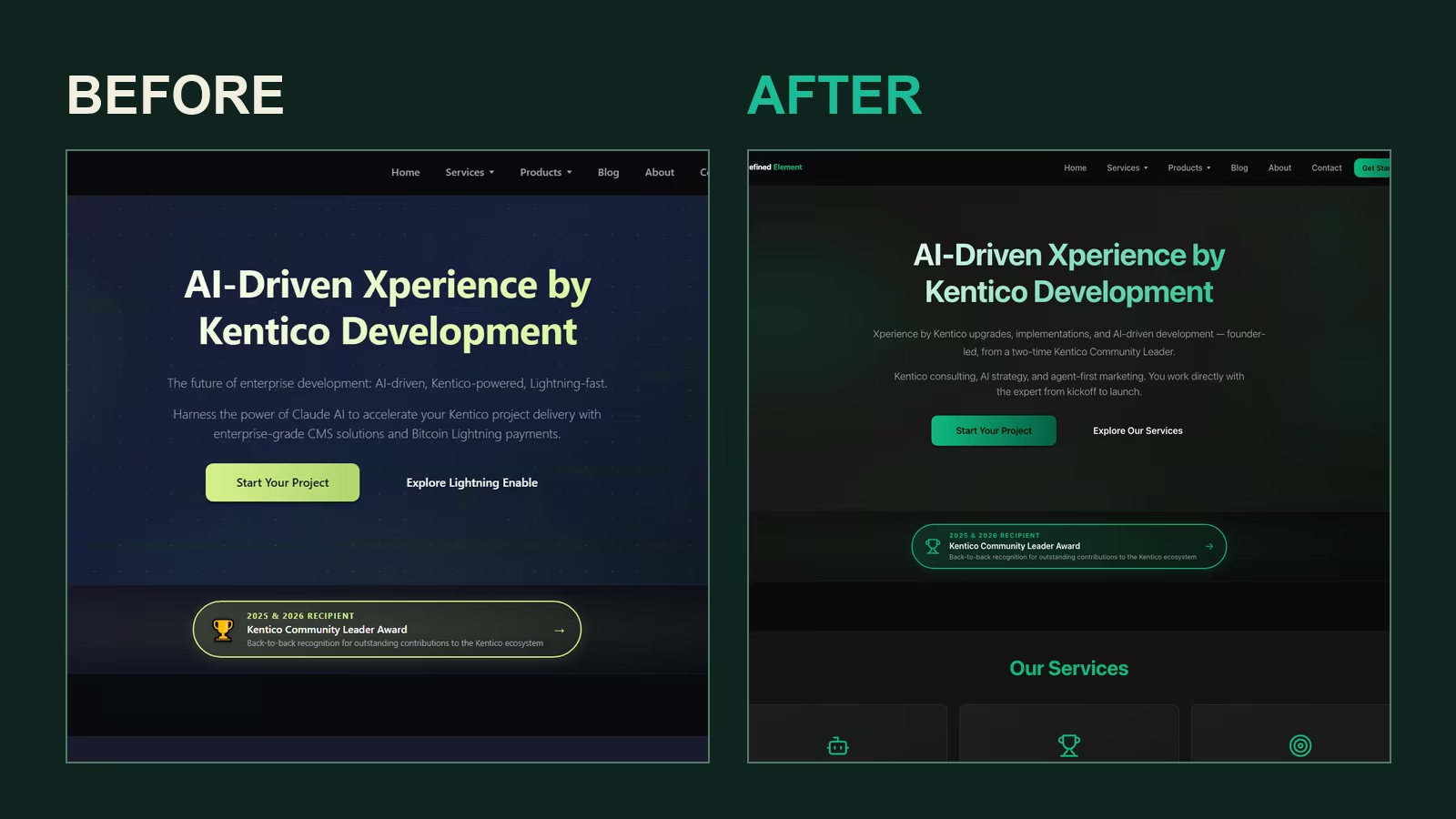
Then the visual pass. The agent pulled a new palette from my logo: deep emerald against near-black. It replaced every emoji in the UI with a proper outline SVG icon system. And it deleted roughly 1,600 lines of dead CSS that had accumulated over the life of the site, the kind of cruft I always mean to clean up and never do. I reviewed screenshots at each step, made the brand calls, and signed off before anything merged. This was not the agent redecorating unattended. It proposed, I judged.
The repositioning
This is where it stopped being cosmetic. Refined Element had drifted into reading like a payments company because of a product I built. That product, Lightning Enable, has its own home now at lightningenable.com — it is Refined Element's software, run under its own brand — so the site needed to speak for the consulting practice again: Kentico upgrades and implementations, AI consulting, and agent-first marketing. Kentico calls that last one GEO, generative engine optimization: making your content legible to the AI systems that increasingly sit between you and your buyers.
There is a clean number for the drift. My llms-full.txt file, the plain-text summary AI crawlers read, had a keyword skew of 162 to 28 toward payments. After the repositioning it was 15 to 213 toward consulting. The site now says what the business actually does.
The CMS-first rework
Here is the section I would have called science fiction a year ago. Every content change happened through the Management MCP. Not the admin UI.
- It created two new content types, FAQ Item and Case Study, defining the fields and their allowed relationships the way an editor would in the modeling screen, except it did it from the same conversation that had just found the gap.
- It seeded more than twenty content items into those types: FAQ entries, case studies, service descriptions.
- It created new service pages that wired themselves into the site navigation automatically, because the nav is content-driven and the pages were real, published web pages. The page exists in the tree, so it exists in the nav.
- It edited hero copy, service cards, and blog tags the same way, and the blog got a working topic filter, tag chips ranked by usage, backed by the retagging.
Zero admin-UI clicks for the content. Zero content deploys. And the important part for anyone who has watched an agent hallucinate a schema: every one of those writes went through the same validation the admin UI enforces. Required fields, field types, relationship constraints. If a write would have been invalid in the CMS by hand, it was invalid through the agent. The Management API is not a side door. It is the front door with the guardrails intact.
The GEO plumbing
On the machine-readable side, the agent rewrote llms.txt and llms-full.txt and added FAQPage and Service JSON-LD structured data. One fix there is worth calling out because it is a trap I have seen on other sites. The JSON-LD had been getting HTML-entity-encoded on render, which made it invisible to the regex-based crawlers many AI systems still use. Encoded structured data looks fine to a browser and is effectively blank to the crawler. Structured data you emit but nobody can parse is just decoration. That is now corrected.
The production sync
All of the above happened locally. Getting it to production was the last step, and it is where the tooling earned real respect. There was exactly one production code deploy, for the redesign and the bug fixes. Every content change reached production a different way: the same Management MCP replayed the entire content-model and content changeset against the production database, with the same validation it had used locally.
During that sync the agent surfaced something I did not ask it to find: three dangling content references on the homepage, pointing at items that no longer exist. Pre-existing data corruption, invisible in the rendered page, sitting quietly in the database. And those three dead references mattered more than they look, because Kentico revalidates the entire page on publish. Until they were cleared, no field on the homepage could be edited at all. Not even a one-line subtitle change.
The moment the guardrails showed up
Here is my favorite part of the whole project, and it is a permission denial.
The obvious fix was to clear the three dead references. The write is harmless: the items they point to no longer exist, and the section that would render them is switched off. The agent knew all of that. It still refused to do it on its own authority.
The sync had been scoped as additive only: create types, create items, update the fields we had agreed on, delete nothing. Clearing a field is not additive. So the write was blocked twice. First by the subagent running the sync, which stopped and reported rather than improvising. Then by the permission layer in Claude Code itself, when the main session attempted the same patch. The message was, in effect: this clears production data the user never named. Not doing it.
What happened next is the part I would show a skeptical CTO. The agent stopped, laid out the situation, and asked me to decide, with three concrete options: authorize it to clear the references through the Management API, with the GUIDs recorded so the change could be reversed; leave the agent out of it and I remove them by hand in the Xperience admin UI; or skip the homepage changes entirely. I picked the first. The clear went through the same validated endpoint as every other write, the page published cleanly, and the homepage updates landed.
Guardrails in both directions, in other words. Kentico validated every write the agent made, and the agent's own permission system refused to exceed the mandate I had given it, even when the workaround was technically trivial and arguably correct. An agent that asks at the right moment is worth more than one that never has to.
Where the human stayed
I want to be exact about the boundaries, because this audience will and should fact-check.
- The Management API is a dev-only preview package today. It runs locally against the app and is gated to the Development environment. This is not an agent editing production unattended, and nobody should represent it that way.
- I stayed in the loop the entire time: reviewing screenshots, making brand decisions, approving before merge. I personally caught a service card the agent had mislabeled, which is exactly the kind of judgment call that is mine to make and not the tool's.
- And when the sync hit something outside its mandate, it did not improvise. It asked.
The part people underrate
Most of the conversation about AI and your CMS frames it as something you chat with. Ask it a question, get an answer. That framing undersells what actually happened here.
The Management MCP does not make your CMS something you talk to. It makes it something your agent can operate. Content modeling, content entry, page creation, publishing, all executed as real operations with admin-UI-grade validation on every write. The mechanical parts of running a Kentico site, the modeling and the data entry and the wiring, become agent work. The judgment, brand, accuracy, and what belongs on the page, stays human. The line between those two is the whole ballgame.
For a one-person consultancy that split is the difference between a site I maintain in the margins and a site that keeps pace with the work. For twelve years, since version 7, the pattern of Kentico work has been the same: a person in the admin UI, clicking through screens, one field at a time. I do not think that is where this goes. The modeling and the entry increasingly move to the agent, running against the same validation an editor would, while the people who know the business spend their time deciding rather than clicking.
If you run Kentico, start with the KentiCopilot documentation, install it against a dev copy, and give your agent one real task. The tooling to do this is a preview package today. It will not stay one. I would get familiar with it now.