Kentico Sentinel: The Spreadsheet of Shame, Now With a Dashboard
Every Xperience by Kentico site I have ever operated, mine or someone else's, eventually develops the same artifact. It is not a README. It is not a runbook. It is a Google Sheet with a title like "Things To Check Before The Client Notices."
You know the one. Tab 1: stale articles nobody has touched since the launch party. Tab 2: a list of media assets that may or may not still be referenced anywhere. Tab 3, helpfully titled "??? config drift ???", where somebody wrote down that production has a different connection-string timeout than staging but never got around to fixing it. Tab 4 is EventLog entries that looked spooky that one Tuesday. Tab 5 is a single cell that just says UseWebOptimizer with three question marks after it.
Everyone builds this spreadsheet. Nobody maintains it. Two weeks later it is already lying to you.
Today I am releasing the thing that should have replaced that spreadsheet about three years ago. It is called Kentico Sentinel, it is MIT-licensed and completely free, and it is live on NuGet now.
Why this exists
Three years of running Xperience by Kentico sites, including the one behind Lightning Enable (our Bitcoin Lightning payment integration for Kentico Commerce), taught me that the real operational risk in a Kentico site is almost never the dramatic stuff. It is not the outage. It is the slow accumulation of small, boring problems that each individually could be fixed in ten minutes, but collectively nobody has time to audit.
A content editor unpublishes an article but leaves the page. An asset gets orphaned when somebody redesigns a landing page. Somebody adds a middleware call in the wrong order in Program.cs and breaks Page Builder preview mode, but only in preview, so QA misses it. A cache policy gets silently flipped. The EventLog starts filling up with the same warning three times an hour. A dependency version skews between environments.
None of these are fires. All of them are the reason the senior dev on your team is tired.
What Sentinel actually does
Sentinel is a scheduled health scanner that runs inside your Xperience by Kentico app. No external agent. No cloud dependency. No telemetry leaving your box unless you configure email digests.
At launch it ships with 13 built-in rules across four categories:
- Configuration — middleware ordering, cache policies, connection-string sanity, the stuff that looks fine until it isn't
- Dependencies — NuGet drift, skew between environments, references that should have been updated two upgrades ago, and — this one matters — Xperience by Kentico refresh drift. If your XbyK refresh is behind, Sentinel tells you. The newer refreshes unlock real functionality, and operators who stay current have measurably fewer of the other problems on this list.
- Content — stale items, orphaned assets, broken references, the things your editors promised they'd clean up
- Observability — EventLog noise, warnings that keep reappearing, the errors everyone has learned to ignore
Rules are deterministic — no LLM in the hot path, no mystery meat. A rule either fires or it doesn't, and you can read the source. (A future "Fix it with AI" paid tier for v1.1 will layer remediation suggestions on top, but the scanner itself stays plain old code forever.)
One compatibility note worth stating plainly: Sentinel only supports Xperience by Kentico 31.x — and at this point it has been tested across multiple 31.x refreshes and runs without a hitch on every one. Drop it into a 31.0, drop it into the latest 31.4.x, and it just works. If you're still on Kentico Xperience 13, this is not a tool for you — yet. It is, however, one more reason to schedule that migration. The gap between KX13 and XbyK has become substantial, and the tooling story (Sentinel included) now lives on the XbyK side.
The part nobody else gets right
Here is my favorite feature, because it is the one every homegrown monitoring tool eventually fails at: acknowledgments that stick.
When Sentinel finds a problem, each finding gets an identity hash based on what the finding is about, not on when the scan ran. Acknowledge a finding once — "yes, I know, we're leaving it that way until Q3" — and it stays acknowledged. The next scan runs, regenerates every finding from scratch, and your acknowledged items stay quietly tucked away. No duplicates. No re-notification. No "wait, didn't I already dismiss this?"
This sounds like a detail. It is the difference between a tool you actually use and a tool you mute after three days.
You can also snooze a finding for a specific duration if you want it to come back and nag you in two weeks.
What this unlocks (and why it matters)
The most interesting part of Sentinel is not the dashboard. It is the output.
Every scan produces a structured JSON report: refresh drift, outdated NuGet packages, configuration issues, content problems. It is machine-readable by design.
That turns site health into an input, not just a report.
I tested this on my own production site. I was a few refreshes behind and about to ship a new product. Normally I would step through the upgrade manually — check versions, bump packages, verify nothing breaks, deploy carefully.
Instead, I exported Sentinel’s JSON and handed it to an AI agent with a simple instruction: bring everything up to the latest compatible Xperience by Kentico refresh.
About ten minutes later, the production site was upgraded. NuGet packages aligned. No downtime. No manual edits. I did not touch a single file.
That is a different category of workflow.
Sentinel is deterministic — it tells you exactly what is wrong. But once the output is structured, it can be consumed by systems that can act on it. Upgrade paths, dependency alignment, even certain classes of configuration fixes become automatable.
This is not “AI in the scanner.” The scanner stays plain code. This is about making the system self-describing enough that something else can safely execute the work.
The admin experience
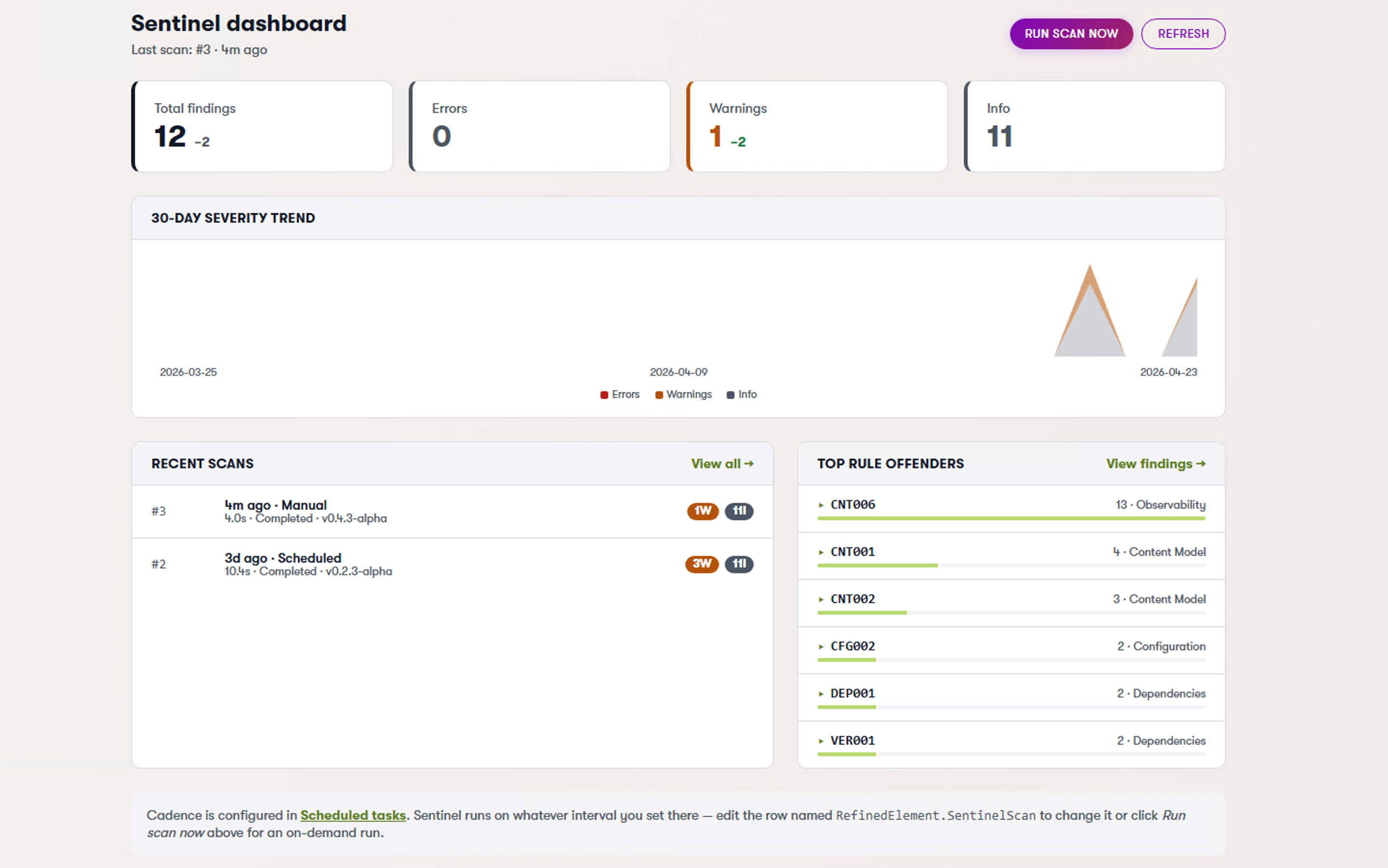
Sentinel ships with an optional Admin UI package that plants a dashboard directly inside the Xperience admin. No separate portal. No extra login.
The dashboard is intentionally simple.
You see what matters:
- What’s out of date
- What’s broken
- What needs attention
No noise. No filler metrics.
You don’t have to dig through logs or piece together information from different parts of the system. It’s all in one place, in a format that makes sense immediately.
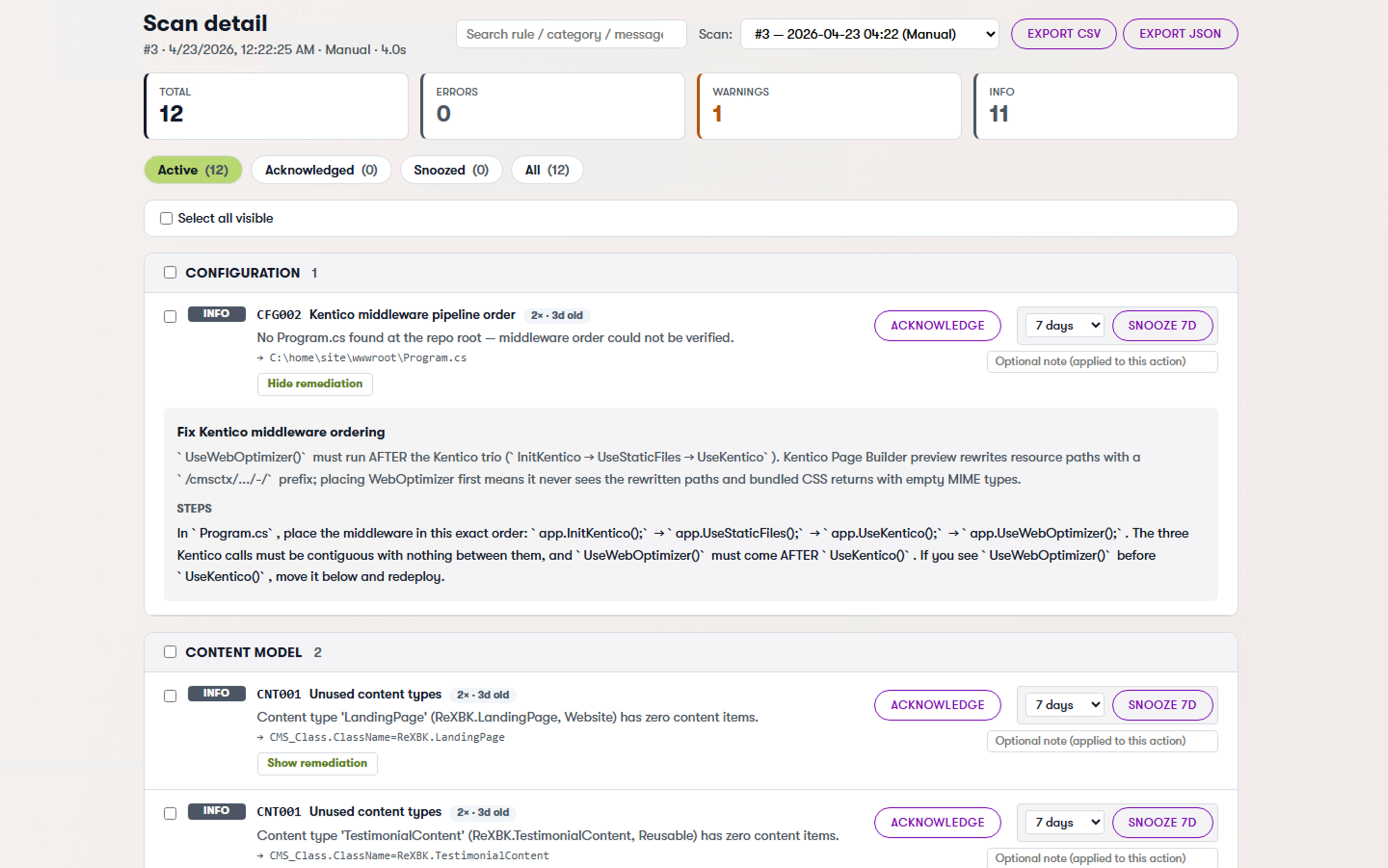
The settings screen lets you tune scan cadence, pick which rules to enable, and configure the email digest — and it is editable inside the admin, with a DB-backed override store that wins over appsettings.json. Tune a threshold at 2am without opening your IDE.
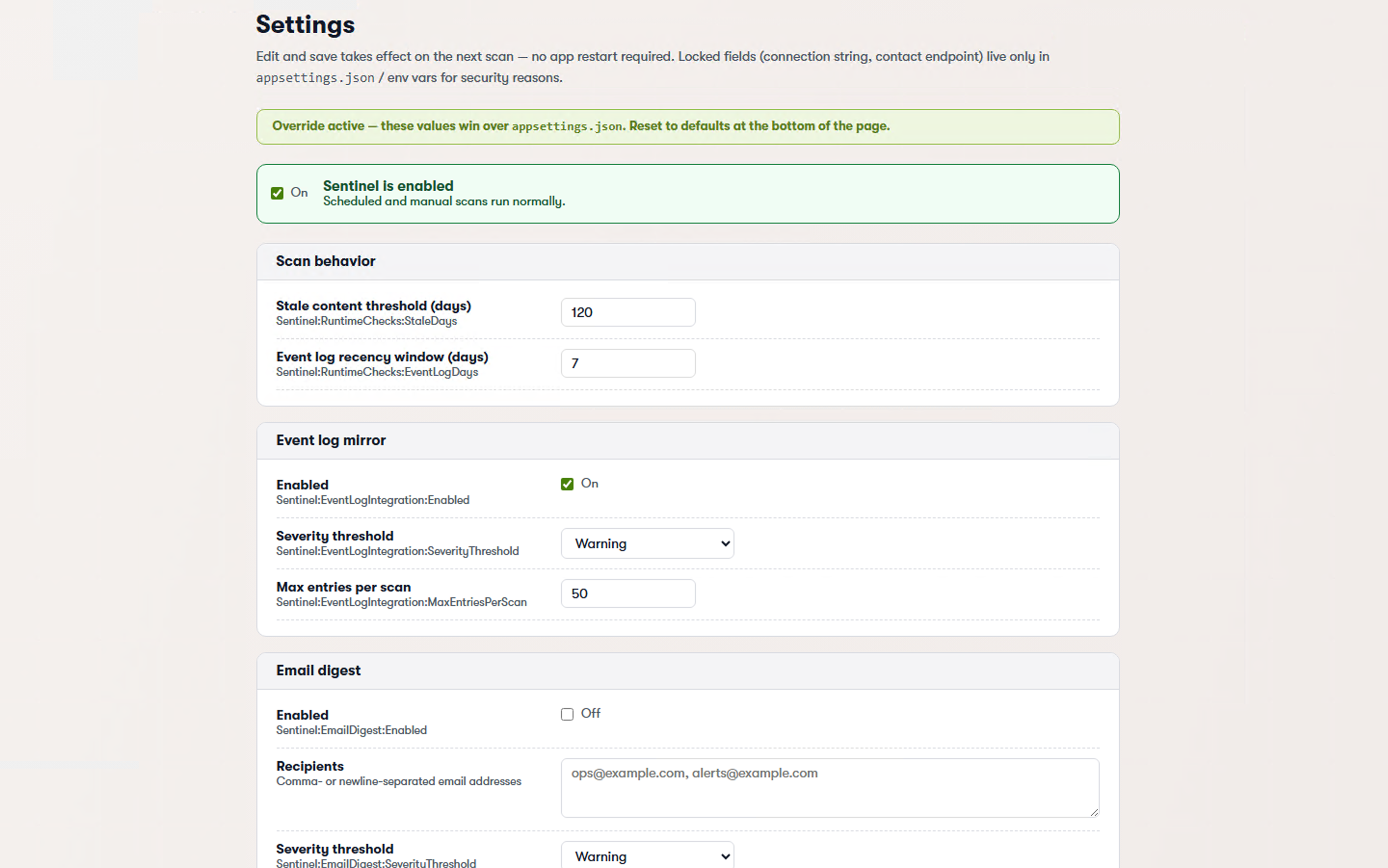
The diff view is the one I end up in most often: it shows what changed between two scans — findings introduced, findings resolved, findings still open — which is how you catch regressions introduced by a deploy.
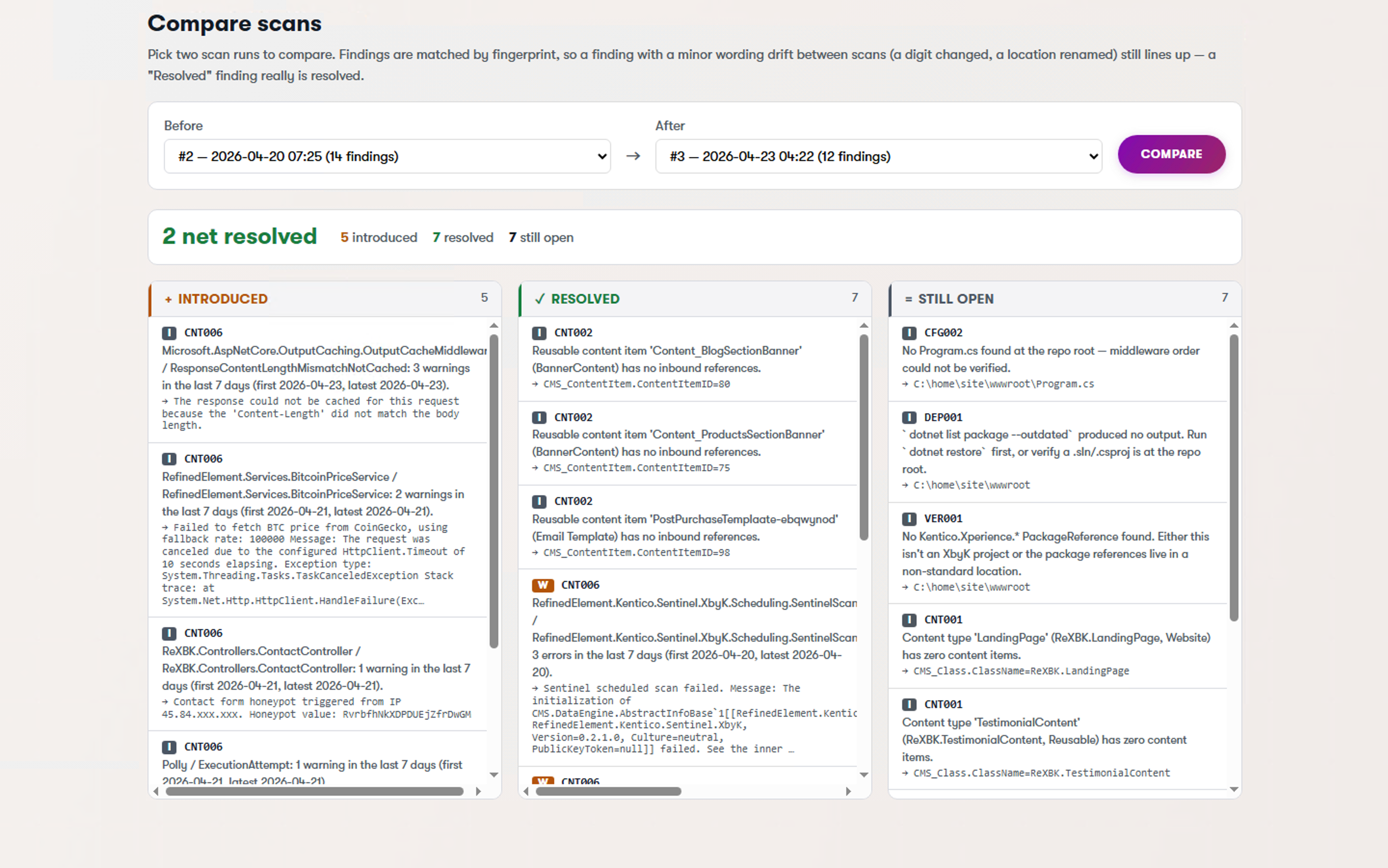
And the snooze panel lets you manage all your "not right now" decisions in one place, with timestamps, so nothing disappears forever.
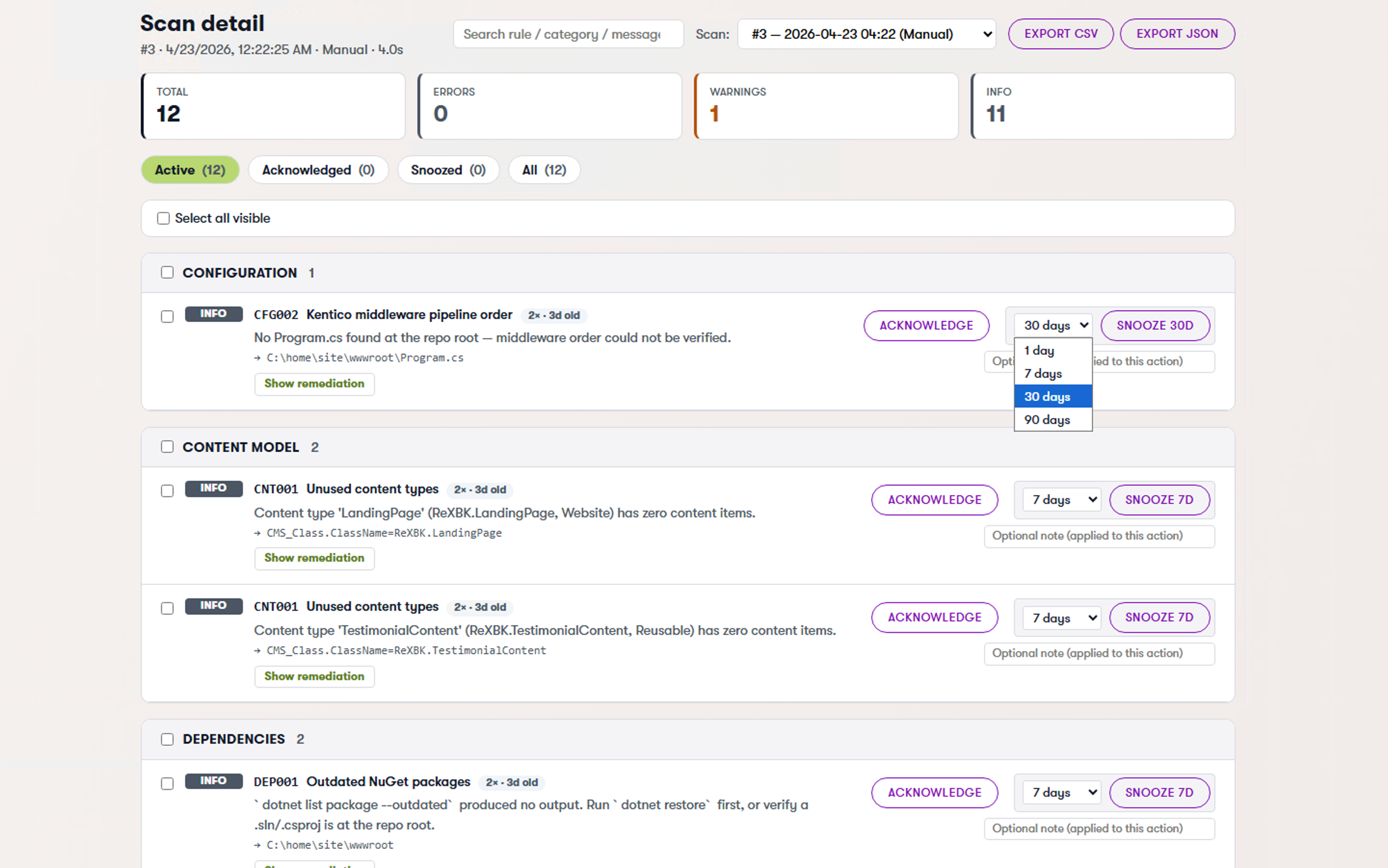
There is also a one-click "Request a quote" button that ships a sanitized scan snapshot to Refined Element for a fixed-price remediation estimate. Use it, don't use it — the scanner itself is free forever, the quote flow is entirely opt-in, and the snapshot is scrubbed before it leaves your box. It exists because some teams would rather hand a finding list to someone and have it fixed than spend a sprint triaging it themselves. Fair enough.
For teams that want to fail a CI build when a new high-severity finding appears, there is a dotnet CLI tool (RefinedElement.Kentico.Sentinel) that runs a scan against your configured connection and returns a non-zero exit code when things are ugly. Drop it in a pipeline and your next sloppy PR gets caught before it ships.
Installing it
Two lines. That is it.
dotnet add package RefinedElement.Kentico.Sentinel.XbyK
dotnet add package RefinedElement.Kentico.Sentinel.XbyK.Admin
Then in Program.cs:
builder.Services.AddKenticoSentinel(builder.Configuration);
The .Admin package is optional — skip it if you only want scheduled scans and email digests without the in-admin dashboard. There is also a .Core package if you want to embed the scanner in something bespoke.
What is next
Current release is v0.4.3-alpha — feature-complete for the launch and validated against multiple Xperience by Kentico 31.x refreshes without a hitch. The "alpha" tag is about polish and rule coverage, not stability; we're shaking out the last edge cases before v1.0.
The committed roadmap, roughly:
- More rules. 13 is a start. I want 30+ by year-end, and I want the good ones to come from other Kentico developers. PRs welcome.
- "Fix it with AI." An optional paid tier in v1.1 that takes a finding and proposes a code-level or content-level fix. The base scanner stays 100% free forever. That is a line in the sand. I am not going to quietly paywall rules that used to be free.
- Better digests. Slack, Teams, whatever people actually use.
And a few things I am exploring but not committing to — call them the exciting maybes:
- Auto-heal. One-click remediation. Sentinel proposes a fix; you click approve; it opens the PR (or applies the content-side change directly for low-risk stuff). The hard part here is earning the trust to let a scanner write code in your repo.
- Content performance loops. Connect Sentinel's content checks to engagement metrics. Stale article getting zero traffic? Suggest a rewrite. Two variants live? A/B test them based on real performance and archive the loser. This gets into content-ops territory fast and I want to make sure we do it well before we commit.
Things I am explicitly not promising: multi-site dashboards, hosted SaaS, alerting integrations that don't exist yet. If it ships, it ships in the changelog. I would rather under-promise.
Help me build it
Sentinel is alpha. It is also the kind of tool that gets meaningfully better the more eyes are on it. If any of the following apply to you, I genuinely want to hear from you:
- You have a rule you wish existed. Tell me. "Alert me when X" is the best kind of issue to open.
- Something in the UI is clunky. I have been staring at this admin app for months. I cannot see it with fresh eyes anymore. You can.
- You found a bug. Reproduction steps, screenshot, the usual. I will fix it.
- You want to track something specific on your site that Sentinel doesn't cover. File an issue with the use case. Even if I can't ship it, the signal is useful.
- You want to contribute a check. The
Corepackage is deliberately host-agnostic so new rules are a single-file PR in most cases.
GitHub issues is the right channel for all of the above. I read every one.
Go try it
- GitHub: github.com/refined-element/kentico-sentinel
- NuGet: RefinedElement.Kentico.Sentinel.XbyK (embedded), .Admin (UI), .Core (library), and the RefinedElement.Kentico.Sentinel CLI tool
- License: MIT
Built by Refined Element — Kentico Community Leader 2025 and 2026 (same award, two years in a row, I am as surprised as anyone).
If Sentinel flags something embarrassing on your site within the first ten minutes, that is not a bug. That is the whole point. Go delete your spreadsheet.